
Policy and SOP review, approval, and training evidence in one place.
ApprovaDoc runs document review, approval, and revision-based training for small regulated teams, and exports the records auditors and assessors actually ask for.
Small regulated teams shouldn't need a full eQMS to prove policy and SOP training.
Most small regulated teams run policy and SOP review, approval, and training on spreadsheets, email, and shared drives. Then an auditor starts asking questions.
What auditors ask
- Who acknowledged this SOP?
- Which revision did they read?
- Who reviewed and approved this version?
- When was this document last reviewed?
- Is this the current effective version?
- Was retraining triggered after the update?
- When was it assigned and completed?
- Who is overdue right now?
- Can you export the evidence immediately?
One focused system for the SOP lifecycle.
Review, approve, distribute, train, and maintain controlled SOPs in six steps an auditor will recognize.
Upload your controlled SOP
Add the SOP or policy to a controlled register with its document ID, owner, revision, and effective date. Start as Draft.
Submit for review & approval
Reviewers add comments and approve or reject. Approvers sign off, with Part 11 e-signatures on Team and Growth.
Assign training
Choose the members who need to acknowledge the effective version. Add an optional quiz, and every score and attempt is kept.
Let reminders run
The system handles due-date reminders, overdue follow-up, and periodic review every 6 to 36 months.
Reassign when documents change
Release a new revision and trigger fresh review, approval, and acknowledgment, with earlier records kept intact.
Export evidence when needed
View live status or download revision-specific records by document or date range.
What audit-ready looks like.
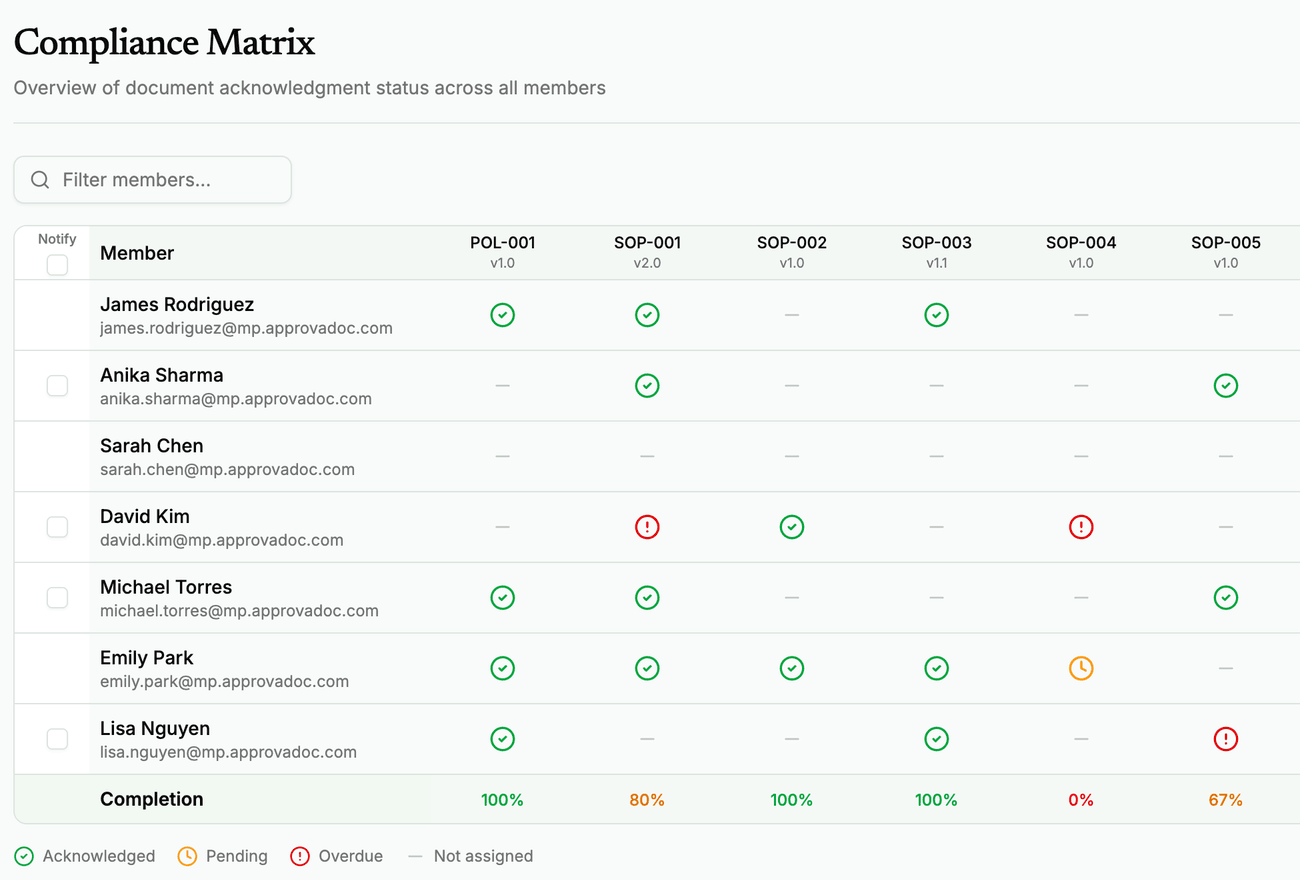
Screens from our demo workspace, a fictional medical device team. Download the sample exports below.
Designed around what auditors and assessors actually ask for.
Every design decision in ApprovaDoc prioritizes producing training evidence that holds up under scrutiny, whether you are preparing for ISO 13485 certification, an accreditation assessment, or maintaining ongoing compliance.
Structured review & approval
Every review decision, approval, and comment recorded immutably. Sequential phases and e-signatures keep the order straight.
Immutable acknowledgment records
Every read-and-understood record is write-once. No edits, no deletions, no exceptions.
SHA-256 document integrity
Every document version is hash-verified at upload. Auditors can confirm nothing was altered after the fact.
Part 11 electronic signatures
Re-authenticated, HMAC-bound electronic signatures designed to support 21 CFR Part 11. Available on Team and Growth plans.
One-click audit exports
Training matrix, acknowledgment history, overdue reports, retraining records: all export-ready in minutes.
Complete audit trail
Every action logged with who, what, when, and from where. Immutable and always available for inspection.
Built from real audit experience.
ApprovaDoc comes from direct experience developing medical devices, navigating ISO 13485 and FDA audits, and working inside quality systems of every shape and size.
We built it because small teams deserve focused training-evidence tooling, not a module buried inside a platform designed for much larger organizations.
Transparent plans, self-serve start.
Self-serve checkout and fast setup. No demo gate.
Free Trial
- 5 team members
- 5 active documents
- Document review & approval
- Periodic review
- Revision-based acknowledgments
- Comprehension quizzes
- Training matrix
- Exports & reminders
- Audit trail
Startup
- 10 team members
- 50 active documents
- Document review & approval
- Periodic review
- Revision-based acknowledgments
- Comprehension quizzes
- Training matrix
- Exports & reminders
- Audit trail
Team
- 30 team members
- 150 active documents
- Everything in Startup
- Priority support
- Part 11 e-signatures
Growth
- 75 team members
- 400 active documents
- Everything in Startup
- Priority support
- Part 11 e-signatures
Asked, answered.
Replace the spreadsheet workaround with records you can stand behind.
Review and approve policies and SOPs, track acknowledgments by revision, automate retraining, and export audit-ready records, all in one focused system for small regulated teams.